
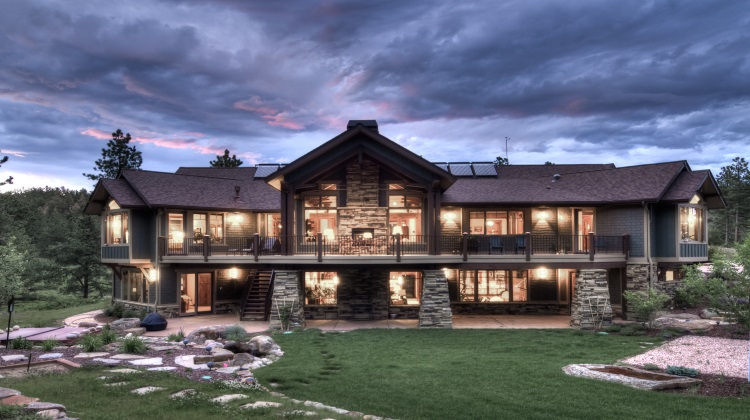
Choosing A Security System For An Australian Holiday Home
A holiday home should feel restful when you are there and reassuring when you are away. That requires more than installing a camera at the front door. The right setup combines intrusion detection, fire and environmental alerts, reliable communications, sensible lighting, and an app that makes remote checks quick rather than stressful.
Australian properties can sit vacant for weeks, face long distances between neighbours, or experience very different risks from Sydney apartments, coastal Queensland houses, and rural Victorian retreats. Before comparing brands, consider the building, the local environment, your internet connection, and how much monitoring you genuinely need.
Start With The Property And Its Risks
Walk around the house as if you were trying to enter unnoticed. Check sliding doors, garage access, side gates, skylights, sheds, and windows hidden from the road. A compact city unit may need a door sensor and intercom camera, while a sprawling acreage property could require several outdoor cameras, driveway detection, and a long-range wireless bridge.
Consider hazards unrelated to burglary as well. Smoke, rising water, a failed freezer, extreme heat, and power loss can cause expensive damage before anyone visits. A temperature sensor is useful in a remote home, particularly if it contains wine, medical supplies, pets, or equipment that should not remain in a hot, sealed building. In bushfire-prone areas, external cameras and smoke alerts may provide valuable early information, though they should never replace an approved fire plan.
Your daily habits also matter. Australians often leave outdoor furniture, trailers, tools, and bicycles in garages or under verandahs, creating several points worth protecting. If the property is near a beach, account for salt air and corrosion; if it is in regional New South Wales or Queensland, dust, heat, and patchy connectivity may influence equipment choices more than a sleek feature list.
Build Layers Instead Of Relying On One Camera
A camera records an event, but it may not prevent one or tell you that a door has been opened. A layered security system usually starts with contact sensors on external doors and accessible windows. Motion detectors cover hallways and living areas, while a keypad, key fob, or phone app controls arming and disarming.
Outdoor cameras are most effective when positioned to identify faces and activity rather than simply capture a wide view of the sky. Use one for the entrance, another for a driveway or gate, and additional units only where they solve a clear blind spot. Motion-activated lighting can improve footage and discourage trespassing. For broader lighting ideas around paths and gardens, explore these landscape lighting principles while planning how illumination and cameras will work together.
A video doorbell can be useful for deliveries, tradespeople, and unexpected visitors. Sirens may deter opportunistic intruders, but they can frustrate neighbours if false alarms occur. Look for adjustable detection zones, person and vehicle recognition, privacy masking, two-way audio, and useful night vision. A system that sends constant irrelevant notifications will eventually be ignored.
| Security option | Best suited to | Advantages | Points to check |
|---|---|---|---|
| Standalone Wi-Fi cameras | Small homes with strong internet | Simple installation and low upfront cost | Limited automation, cloud fees, and dependence on Wi-Fi |
| Hub-based alarm system | Most suburban and coastal holiday homes | Door sensors, siren, app control, and expansion options | Hub placement, battery backup, and compatibility |
| Professionally monitored alarm | High-value or isolated properties | A response centre can assess alarms around the clock | Monthly fees, verification rules, and contract terms |
| 4G/5G security system | Homes with unreliable fixed broadband | Mobile backup or primary connectivity | Coverage, data allowance, and SIM costs |
| Integrated smart-home setup | Owners wanting cameras, lights, locks, and sensors together | Central control and useful automations | Privacy settings, brand compatibility, and complexity |
Match Connectivity And Power To Australian Conditions
A holiday home cannot depend on a connection that fails as soon as the electricity goes out. Confirm whether fixed broadband, fibre, wireless broadband, or mobile coverage is available at the address. NBN performance varies by property and technology type, while some rural locations may rely on fixed wireless or a 4G/5G router. Test the actual signal inside the house, garage, and near the gate before committing to cellular cameras.
Choose equipment with rechargeable or replaceable battery options where running cables is difficult. A central hub, router, and camera recorder should ideally connect to a UPS so short outages do not disable the entire system. In remote areas, a solar-assisted camera can help, but check winter shade, battery capacity, and the frequency of maintenance visits.
Power interruptions are common enough to plan for, especially during storms and bushfire events. Ask how the alarm communicates when the internet is down and whether the monitoring centre receives a mains-failure signal. If you are also upgrading utilities, this guide to tankless water heaters is relevant because hot-water changes can affect electrical capacity, installation work, and the way you schedule contractors at an unattended property.
Check Privacy, Access And Australian Compliance
Security cameras capture more than your own walls. They may record a footpath, a shared driveway, a neighbour’s yard, or visitors entering a strata complex. Use privacy zones, aim cameras narrowly, and avoid recording private areas that are outside your property. If a cleaner, gardener, or holiday-rental guest will use the home, explain what is monitored and how footage is handled.
Australian privacy and surveillance rules vary according to the state or territory, the type of property, and whether the system is used privately or in a business such as short-term accommodation. The Privacy Act may apply in some organisational contexts, while state and territory surveillance-device laws can govern audio recording and private conversations. Obtain specific advice for your location before enabling continuous audio or monitoring shared areas.
Access control deserves equal attention. Give each person an individual login instead of sharing one master password, remove access when a contractor finishes, and activate two-factor authentication. Change default camera credentials, update firmware, and keep a record of who has keys, codes, remotes, and app permissions. If the home is listed on a platform such as Airbnb, use temporary codes and make sure guests cannot access owner-only recordings.
Compare Monitoring, Maintenance And Total Cost
Professional monitoring can be worthwhile when a property is isolated, expensive, or frequently vacant. A monitoring centre may contact nominated people or emergency services after alarm verification, depending on the provider and its procedures. However, monitoring does not guarantee a police response, and you should read the agreement for call-out charges, false-alarm policies, equipment ownership, and cancellation terms.
Self-monitoring costs less and gives you direct control, but it depends on someone noticing an alert and acting promptly. Nominate a nearby contact who can inspect the property, reset a tripped sensor, or meet a locksmith. A trusted neighbour in Ballarat, the Sunshine Coast, or the Adelaide Hills may be more useful than a sophisticated app if you are several hours away.
Budget for installation, subscriptions, replacement batteries, mobile data, cloud storage, and occasional servicing. Cloud recording is convenient, while local storage can reduce recurring fees and keep footage under your control. Look for clear retention settings rather than unlimited recording that quickly fills a plan or creates unnecessary privacy exposure.
For homes with low ceilings or compact rooms, physical layout affects more than camera placement. Ceiling fans, lights, and sensors can compete for space, so this low-ceiling fan guide can help when coordinating fixtures in bedrooms and living areas. Good airflow and clear sensor coverage should be planned together rather than added separately.
Choose a system that can be tested remotely, sends meaningful notifications, and continues operating during a short outage. Install visible warning signs where appropriate, test every sensor after installation, and schedule a monthly remote check of batteries, camera views, locks, and communications. Before leaving, arm the alarm, confirm the contact list, and record the date of the next maintenance visit.
Protecting a holiday home is an ongoing routine rather than a single purchase. Compare the property’s weak points with the system’s real capabilities, verify Australian legal considerations, and prioritise reliable alerts over impressive specifications. A carefully configured alarm, camera, lighting, and environmental monitoring setup can make an empty house easier to manage from anywhere in the country.
Use this checklist while reviewing products and quotes, then select the smallest system that covers the genuine risks and can be maintained consistently. Once installed, test it in daylight and darkness, during a simulated internet outage, and after every change to the property.